
Hostinger Review (2026): 3+ Years of Real Use
Published Oct 6, 2026
This Hostinger review comes from more than three years of using it, including hosting and migrating real client websites. I have tried several other hosts over that time, and Hostinger is the one I now recommend to my clients. Here is why, with my own screenshots, and where it is not the right fit.

The short version of this Hostinger review
What I like about Hostinger, based on my own use:
- The price is low, and a domain is included.
- hPanel, its control panel, is easy to use, and I find it clearer than the cPanel most hosts provide.
- The built-in AI assistant fixes real problems, not just basic questions.
- Migrating an existing website is free.
What to know first: the low price needs a long term paid upfront, and renewal costs a lot more than the first term. Both are covered below with the actual numbers, including a screenshot of my own renewal price.
Hostinger plans and prices in Pakistan
Hostinger sells three shared hosting plans in Pakistan. Every plan includes a CDN, priority 24/7 support and a 30-day money-back guarantee. These prices were checked on 3 October 2026 and are per month on a 48 month term.
- Single, Rs.399: 1 website, 10 GB SSD storage, a free domain, weekly backups and a free mailbox.
- Premium, Rs.599: 3 websites, 20 GB SSD storage, a free domain for the first year, weekly backups and 2 mailboxes per website free for the first year.
- Unlimited, Rs.799: unlimited websites, 50 GB NVMe storage, daily backups with restore, and unlimited mailboxes free for the first year.
Paid upfront for the full 48 months, that is Rs.19,152 for Single, Rs.28,752 for Premium and Rs.38,352 for Unlimited. For one portfolio or business site, Single is enough. Choose Premium if you already know you will run three sites.
All three are shared hosting, so your site shares a server with others. For a portfolio, a blog, a brochure site or a small WordPress site, that is normally all you need. Heavy, sustained traffic or a large online store is the point to look at a bigger plan.
How to get the Hostinger discount
Our Hostinger discount link takes 20% off the first term of a new plan. It applies automatically, so there is no code to enter. It does not cover renewals and does not combine with other promo codes.
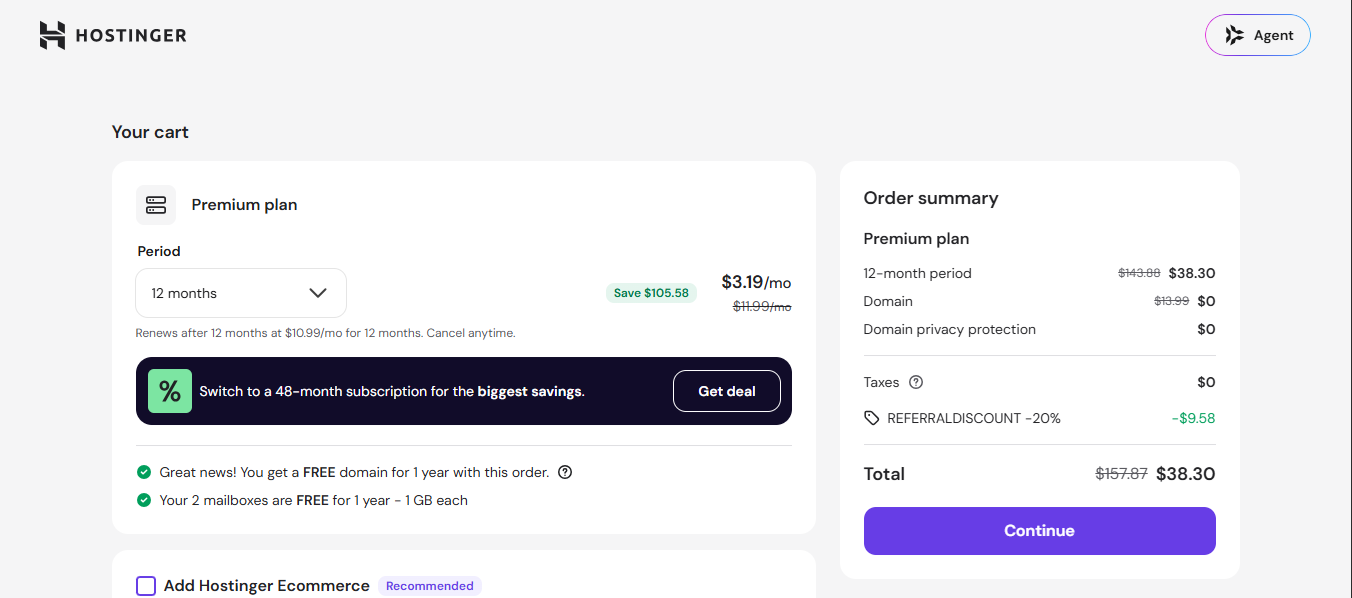
My own cart with the discount applied. The order summary shows a REFERRALDISCOUNT -20% line.
The screenshot also settles a question I had. Hostinger already shows reduced prices, and I wanted to know whether the 20% comes off those again. It does. The discount line took off $9.58, which is far less than 20% of the crossed-out list price, so it is clearly taken from the already reduced price.
One caution: my cart showed dollars, not rupees, so the amounts differ from the Pakistan prices above. The discount itself is the part to check in your own cart before you pay. The deal is also listed, with its last-checked date, on the Hostinger deal page.
The Hostinger renewal price
This is the part most reviews skip, so this Hostinger review puts the numbers up front. When the first term ends, the monthly rate goes up sharply.
- Single: Rs.399 becomes Rs.999 a month, about 2.5 times higher.
- Premium: Rs.599 becomes Rs.1,699 a month, about 2.8 times higher.
- Unlimited: Rs.799 becomes Rs.2,299 a month, about 2.9 times higher.
At those rates, a year of Single costs Rs.11,988, Premium Rs.20,388 and Unlimited Rs.27,588. My own account agrees with the Premium figure.
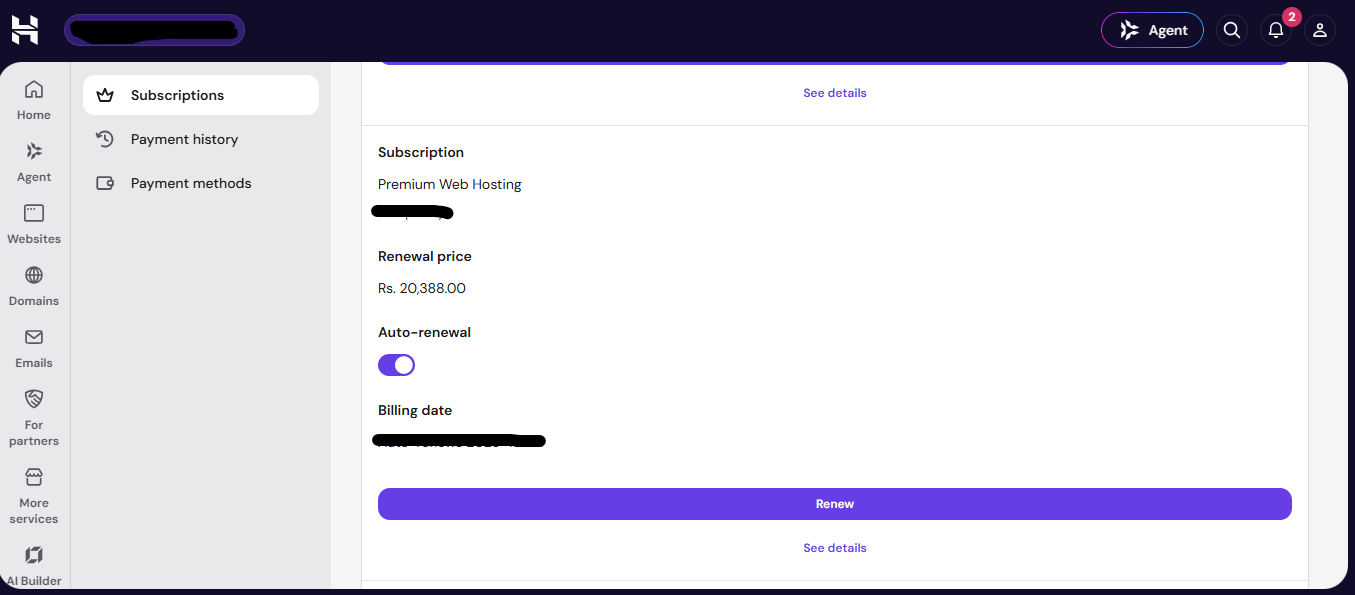
The Subscriptions page in hPanel. Premium renews at Rs. 20,388.00 a year, and auto-renewal is switched on.
Two habits protect you. Put the renewal date in your calendar on day one, and open that Subscriptions page to see whether auto-renewal is on. I have not confirmed which renewal terms Hostinger offers, so the checkout page is the final word.
hPanel: why I prefer it to cPanel
Hostinger built its own control panel, hPanel, instead of using cPanel. This part of my Hostinger review is opinion, from using both kinds for years: hPanel is cleaner and quicker to learn, and I find it easier for beginners and for clients I hand a site over to.
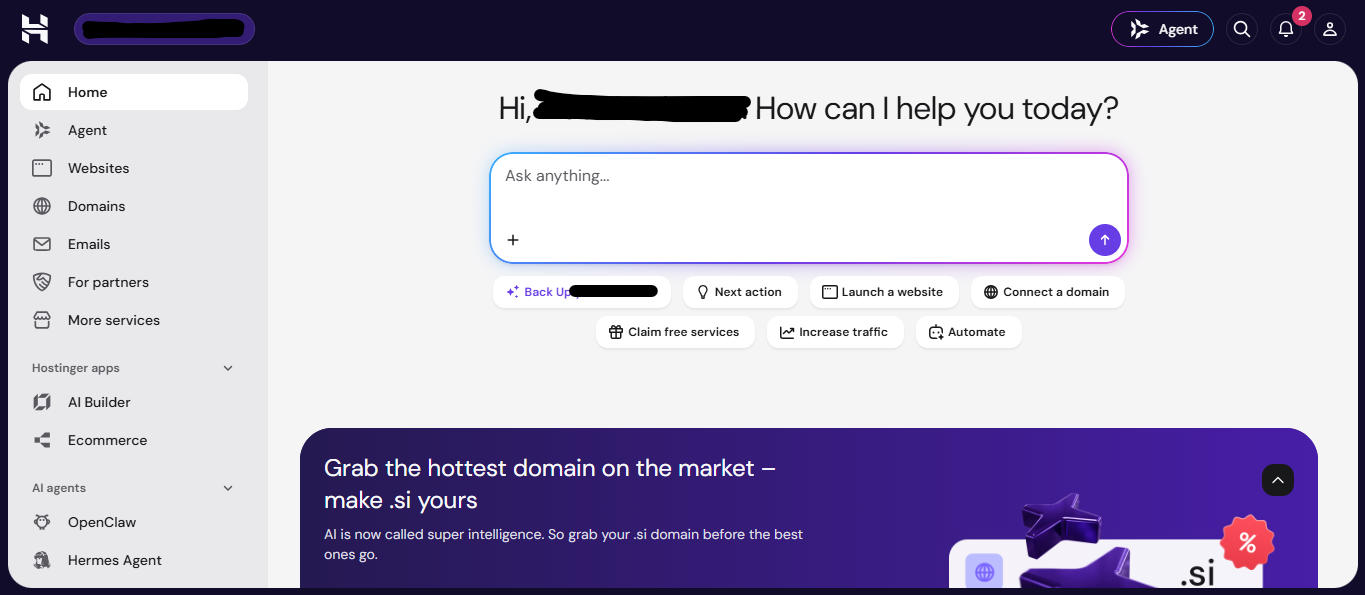
The hPanel home screen. Everything starts from one sidebar and one question box.
The sidebar holds the main areas. Websites is where you add or migrate a site. Domains holds your DNS settings. Emails sets up mailboxes. Agent opens the AI assistant.
Under the question box sit shortcuts such as Launch a website, Connect a domain and Back Up. A first-time site owner rarely has to hunt for anything.
Hostinger's AI assistant, Hostinger Agent
Hostinger has an AI assistant built into the dashboard. It was called Kodee, and Hostinger now calls it Hostinger Agent. You open it from the Agent button at the top right of hPanel or the Agent link in the sidebar.
According to Hostinger, it can both advise and act. It can guide you through troubleshooting, and it can take actions on your account, such as managing DNS records. For risky actions, such as deleting a record or making a purchase, it pauses and shows a confirmation card first.
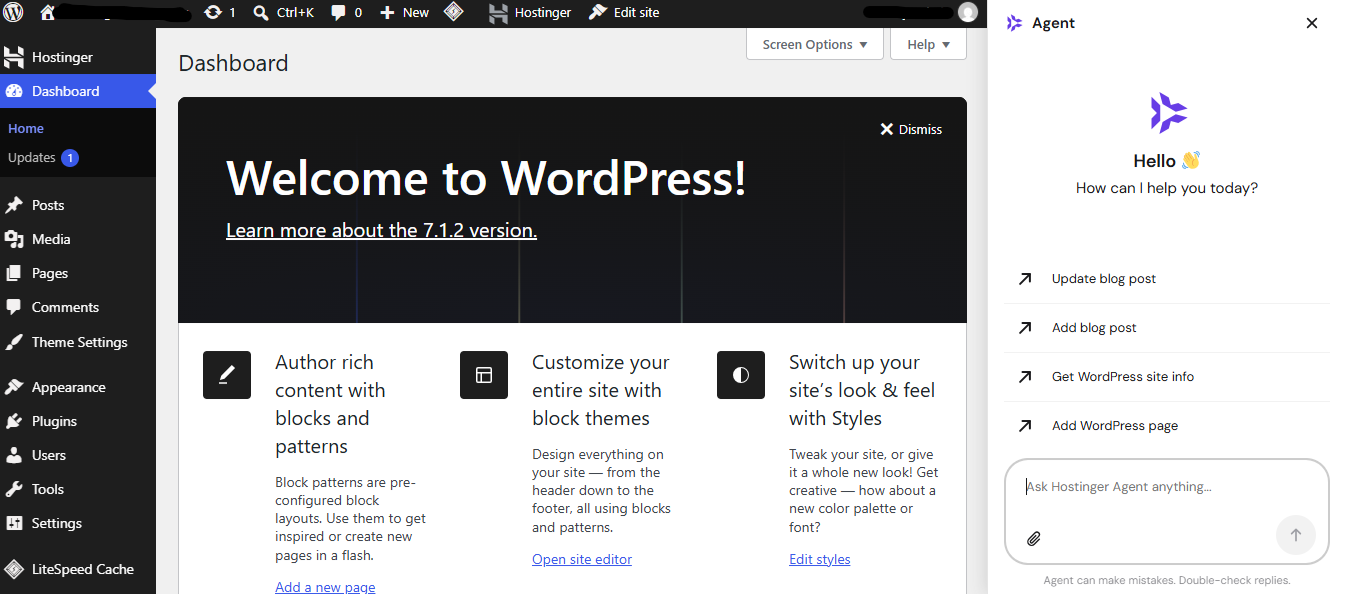
The Agent also opens inside the WordPress dashboard, with shortcuts for blog posts and pages.
In my experience it earns its place. It turns confusing situations into clear steps, which beats a help article you have to hunt for. Hostinger is upfront that it is not perfect. The panel itself warns that Agent can make mistakes and tells you to double-check replies, and I agree with that advice.
A real example: rescuing a client's broken website
A client's website had a critical error and was down. I downloaded the site files and migrated the website to Hostinger. The AI analysed the site and told me it found bugs. I allowed it to clean them up, and within a few minutes the website was back online.
The client was impressed enough to buy Hostinger hosting for their own site. For me, that story is the most useful part of this Hostinger review, and a big part of why I recommend it. It is the kind of result a Hostinger review based on a quick trial would never show.
A fair caveat: this was one site and one kind of error, so results will vary. Hostinger's own documentation does not promise this specific fix. Before you let any tool change your files, keep a full backup.
Another real example: unlocking a domain I had just sold
A domain I had registered with Hostinger was recently sold, so I needed to unlock it and get the authorization code for the buyer. I could not find the right tab, so I asked the Agent instead of searching the menus.
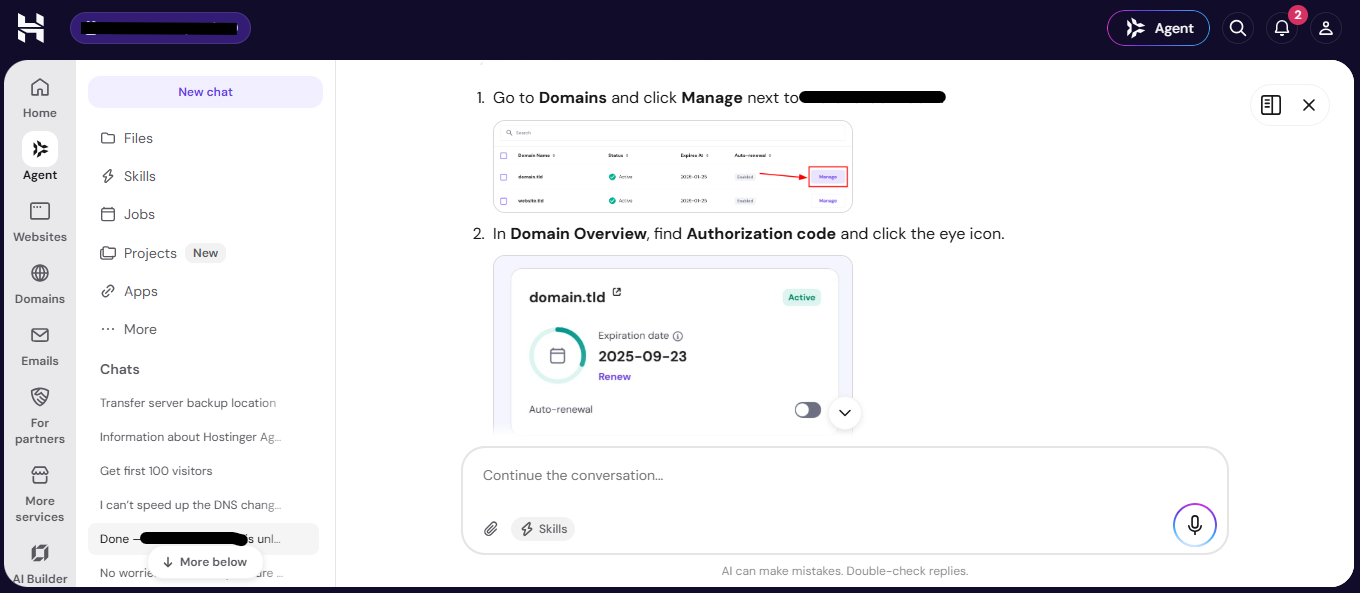
The Agent gave step-by-step directions, with a screenshot for each step.
Then it offered to do the unlocking for me. It stated what it was about to do, warned that disabling the registrar lock leaves a domain open to unauthorized transfers, and waited for me to press Confirm or Deny.
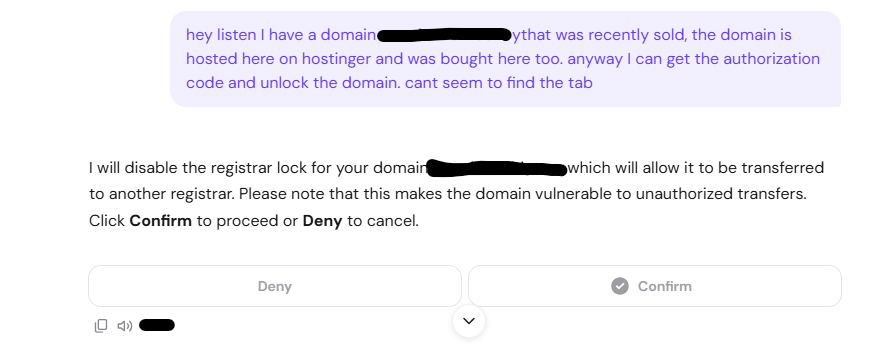
The confirmation card. Nothing risky happens until you press Confirm.
That pause is the feature I trust most. An assistant that can change your account is only comfortable to use if it asks first, and this one does.
In a separate chat, it checked the nameservers on a site I was connecting, confirmed they were correct and synced them. It also warned me that DNS could take 30 minutes to 3 hours to finish.
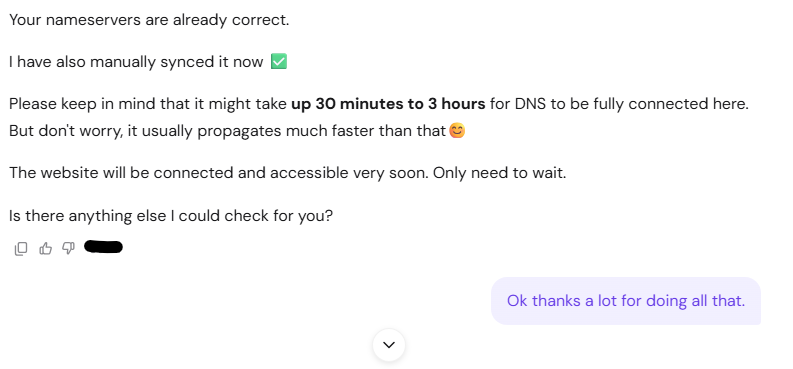
It checked, fixed and explained the wait. I only had to thank it.
Free website migration
Hostinger migrates existing websites for free on every plan, including more than one site. Its page says WordPress sites are typically done in under two hours, while other open-source CMS sites that come from cPanel hosting usually take more than 20 hours.
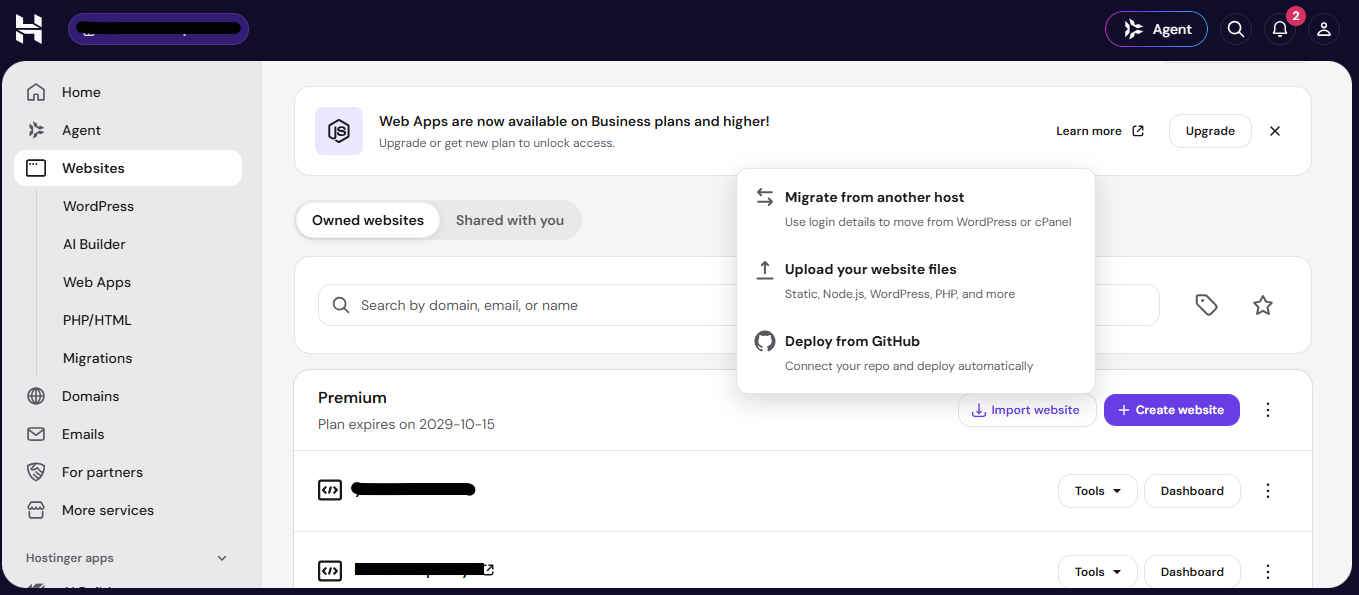
Websites, then Import website. The first option moves a site over using the login details from your old host.
The menu offers three routes: migrate from another host with your login details, upload your website files, or deploy from GitHub. For the client rescue above, I used the manual route of downloading the files and database and uploading them myself.
The one limit to know: sites built on closed website builders cannot be migrated, because Hostinger cannot take the code out.
Support and refunds
The fastest way to get help is the Agent chat in the dashboard. A Customer Success Specialist can join that chat when needed. Hostinger also lists a WhatsApp tab in the agent widget and an email address, support@hostinger.com, for people without an account.
For this Hostinger review I could not confirm phone support or support hours from Hostinger's pages, so I will not claim either. Every plan has a 30-day money-back guarantee, which gives you a month to test it before you are locked in.
Mistakes to avoid when buying hosting
- Picking the longest term without planning to keep the site that long.
- Ignoring the renewal price until the first invoice arrives.
- Skipping your own backups. The Single and Premium plans back up weekly, so a change made today can be lost.
- Waiting past 30 days to test everything, when the refund window is the only free exit.
- Letting any automated tool edit your files without a backup first.
Who Hostinger suits, and who should think twice
This Hostinger review points to students, freelancers and small businesses who want a site online cheaply, with a clear dashboard and help close at hand. It suits people who hand sites to clients, because hPanel is easy to explain.
Think twice if you only need hosting for a few months, since the best price depends on a 48 month term. Think twice too if your site sits on a closed builder, because it cannot be migrated. And if you outgrow shared hosting, Hostinger sells other hosting types, which this review does not cover.
My verdict on Hostinger
After three years, my Hostinger review comes down to this: it is cheap, easy to use, and backed by an AI assistant that has saved me real time. I recommend it to all my clients for those reasons.
The price only works if you go in knowing the renewal rate and the upfront term. If you do, it is hard to find better value for a first website. That is my honest Hostinger review, and it is why I keep using it.
How to get started with Hostinger
- Pick a plan. Single covers one site, Premium three.
- Use the 20% off link and check the cart total.
- Choose your term, knowing the renewal rate from the section above.
- Claim your included domain.
- Log in to hPanel, then add a new website or migrate an existing one from the Websites section.
- If anything goes wrong, ask the Agent before anything else.
Hostinger review FAQ
Is Hostinger good for beginners?
In my experience, yes. hPanel is simple, and the AI assistant helps when you get stuck.
Does Hostinger include a free domain?
Yes. Single includes a free domain, and Premium and Unlimited include one for the first year.
How much does Hostinger cost in Pakistan?
Plans start at Rs.399 a month on a 48 month term, then renew from Rs.999 a month.
Does Hostinger offer refunds?
Yes. Every plan has a 30-day money-back guarantee.
Can Hostinger move my existing website?
Yes, for free, unless it is built on a closed website builder.
Does the 20% discount stack on the reduced prices?
In my cart it did. The 20% came off the already reduced price. Check your own cart total before paying.
Does the discount apply to renewals?
No. The 20% covers the first term only.
Does Hostinger Agent ask before changing things?
For risky actions, yes. It shows a confirmation card with Confirm and Deny buttons first.
This page contains an affiliate link, so I may earn a commission at no extra cost to you. See the affiliate disclosure. Prices in this Hostinger review come from Hostinger's Pakistan hosting page, checked 3 October 2026, and can change. More ways to save are in our student discount guide.
Get the weekly deals digest
One email a week. No spam, unsubscribe any time.